Assistant
The assistant is one Codex session that oversees your agents across every project, so you can ask about all your work in one place.
Use it to ask what is running, to start or check on agents in any project, to be told when agents need you, and to talk instead of type. It does not replace the agents in your projects. It starts them, messages them and reads their reports using the same tools they use.
Start it##
- Click the round button with the sparkle icon in the bottom-right corner of Patterm. Its label is Open assistant when closed and Hide assistant when open.
- Choose Start assistant if it is not running yet.
The assistant needs Codex. It runs as an Integrated conversation, in an internal project that is not listed with your own projects, using the Codex preset set in Settings › Assistant (or Codex's default). When you start it again later, it resumes its earlier conversation.
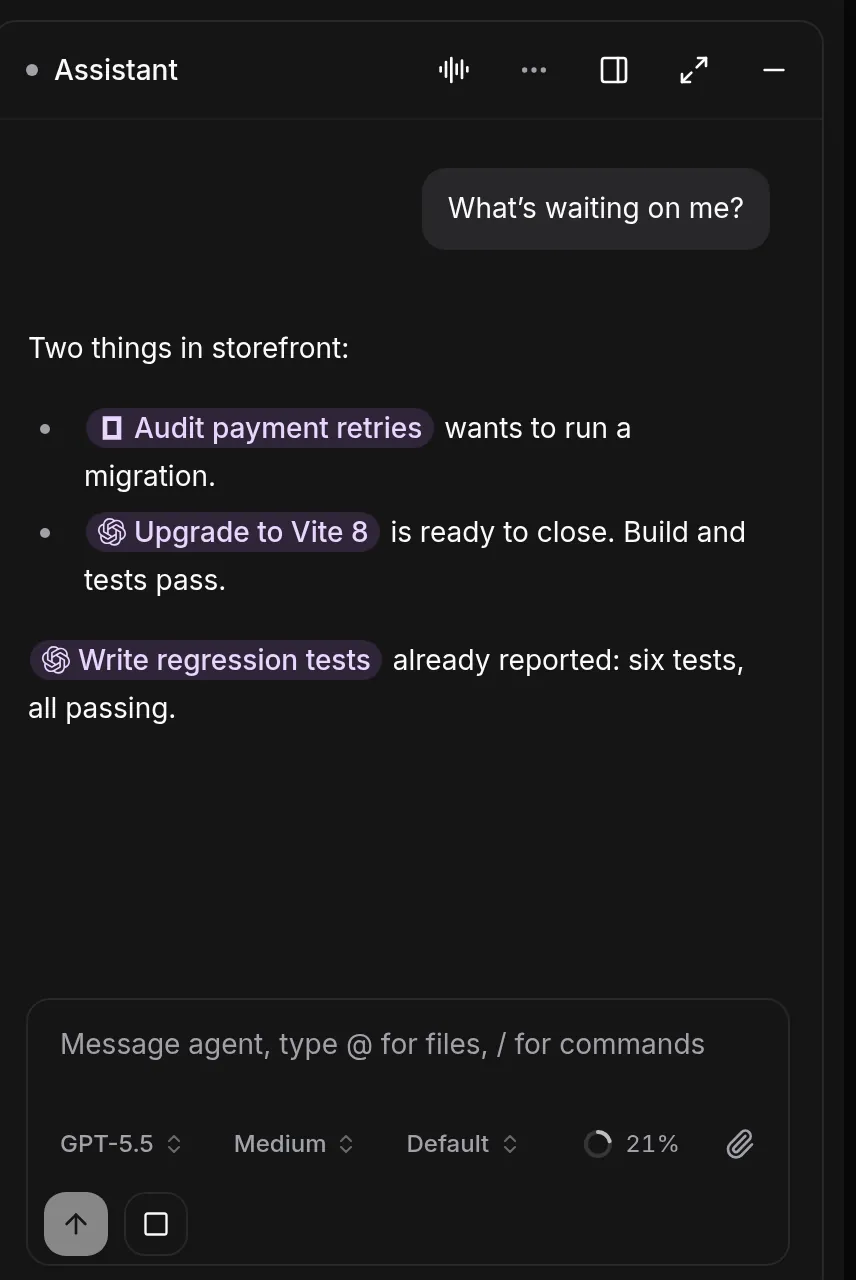
The panel has these controls:
| Control | What it does |
|---|---|
| Voice mode | Switches the panel to a voice session. Choose Back to chat to return. |
| Dock beside the workspace / Float the panel | Pins the assistant next to the workspace or lets it float over it. |
| Open as page / Show as panel | Expands the assistant to fill the window. |
| Minimise | Hides the panel. |
| More assistant actions | Focus mode, Follow the conversation and Restart assistant. |
What it can do##
The assistant is the one agent that works across projects. Other agents can only see and change their own project. It can:
- See every project with its running agents and processes, and every open notification, with
assistant_overview. - List processes, read their output and conversations, and message them, in any project. It passes a
project_idto choose one. - Start agents and processes in a project with
spawn_agentandspawn_process. - Read and manage routines in every project, and set up routines that are not tied to a project.
- Save short notes in its own memory, when memory is on.
Any agent can message it with send_message and the target assistant. Messages to the assistant are limited to 8 KB and about six a minute for each sender.
It keeps your harnesses' native permissions as well. Anything it starts shows the usual prompts in that agent's tab.
Reaching a project from the assistant##
You do not need to name tool calls. Ask in plain language:
What is running right now, and does anything need me?
Start a Codex agent in the billing project to look at the failing invoice test.
Tell me when the review agents in the web project have reported.
When the assistant acts on an agent or process, the action appears in the activity list in voice mode, and you can open the target from there.
Follow the conversation##
With Follow the conversation on, and the workspace visible beside the assistant, Patterm shows the agent, process or project the conversation is about. Each device decides this for itself. If you move somewhere else by hand, Follow pauses until a new topic comes up. When Follow has a target waiting, a bar above the conversation names it, with a Show button.
Focus mode##
Turn on Focus mode from the assistant's actions menu when you want the assistant left alone. While it is on, notifications, agent messages, reports and timer callbacks are held instead of interrupting the assistant. You still see notifications in the app. A bar shows how many items are held, and End focus delivers them to the assistant as a single digest.
You can also ask the assistant to turn Focus mode on or off. It only changes the mode when you ask it to.
Voice##
Choose Voice mode in the panel for a spoken conversation on the same thread. Voice is experimental. It uses a realtime Codex session over WebRTC. If it cannot connect, the panel shows an error with Try again. Use Mute and End voice at the bottom of the panel to control the call.
Settings##
Everything is under Settings › Assistant and saves as you change it.
| Setting | What it does |
|---|---|
| Saved memory | Keeps useful facts across conversations. Older notes are compressed gradually, and high-importance notes last longer. |
| Context budget | About 2,000, 4,000 or 8,000 tokens of the assistant's context for saved memory. |
| Voice | The voice that speaks replies. Applies to the next voice session. |
| Voice profile | Codex default, or Patterm, where Patterm answers status questions itself and hands longer jobs to agents. |
| Acknowledgements | A short spoken "Let me check" when the voice hands off a request: Default, On or Off. |
| Your name | What the voice calls you with the Patterm profile. |
| Model preset | The Codex preset the assistant starts with. Changes apply the next time it starts. |
| Forward notifications | Sends the assistant a short summary when agents need you or finish. In voice mode it tells you aloud. |
Changes to memory settings apply when you start a new assistant conversation.
Restart it##
Choose Restart assistant from the actions menu to stop the assistant and resume its thread in a new process. Do this after changing MCP servers or logins, so it picks them up. A voice call ends with the restart. If it is mid-response, the menu asks you to confirm with Stop the response and restart.
The new process takes over the agents and timers the old one started, and reports that arrive meanwhile wait for it.
To start a clean conversation instead, use /new in the assistant's chat. Saved memory is kept when it is enabled.